
Microsoft Information Protection Administrator - SC-400 Exam Practice Test
Question 1
You have a Microsoft 365 E5 subscription that contains the groups shown in the following table.

You need to create a Privacy Risk Management policy in Microsoft Priv
a. To which groups can you apply the policy?
You need to create a Privacy Risk Management policy in Microsoft Priv
a. To which groups can you apply the policy?
Correct Answer: E
Question 2
You receive an email that contains a list of words that will be used few a sensitive information type.
You need to create a file that can be used as the source of a keyword dictionary.
In which format should you save the list?
You need to create a file that can be used as the source of a keyword dictionary.
In which format should you save the list?
Correct Answer: B
Explanation: Only visible for Actualtests4sure members. You can sign-up / login (it's free).
Question 3
You have a Microsoft 365 E5 subscription that contains a data loss prevention (DLP) policy named DLP1. DLP1 contains the DLP rules shown in the table.

You need to ensure that when a document matches all the rules, users will see Tip 2. What should you change?
You need to ensure that when a document matches all the rules, users will see Tip 2. What should you change?
Correct Answer: B
Question 4
You have a Microsoft 365 ES subscription the uses Microsoft Priva.
You plan to create the Privacy risk management policies shown in the following table.

Which policies can send email notifications, and which policies can show policy tips m Microsoft Teams when a policy match is detected? To answer, select the appropriate options in the answer area.
NOTE: Each correct selection is worth one point.

You plan to create the Privacy risk management policies shown in the following table.
Which policies can send email notifications, and which policies can show policy tips m Microsoft Teams when a policy match is detected? To answer, select the appropriate options in the answer area.
NOTE: Each correct selection is worth one point.
Correct Answer:

Question 5
You have a Microsoft 365 subscription.
You are creating a retention policy named Retention1 as shown in the exhibit. (Click the Exhibit tab.)

You apply Retention1 to SharePoint sites and OneDrive accounts.
Use the drop-down menus to select the answer choice that completes each statement based on the information presented in the graphic.
NOTE: Each correct selection is worth one point.

You are creating a retention policy named Retention1 as shown in the exhibit. (Click the Exhibit tab.)
You apply Retention1 to SharePoint sites and OneDrive accounts.
Use the drop-down menus to select the answer choice that completes each statement based on the information presented in the graphic.
NOTE: Each correct selection is worth one point.
Correct Answer:

Question 6
You need to recommend a solution that meets the sales requirements.
Which three actions should you perform in sequence? To answer, move the appropriate actions from the list of actions to the answer area and arrange them in the correct order.

Which three actions should you perform in sequence? To answer, move the appropriate actions from the list of actions to the answer area and arrange them in the correct order.
Correct Answer:

1 - Upload sample contract documents to a seed content folder in SharePoint Online.
2 - Create a trainable classifier.
3 - Create an auto-labeling policy for sensitivity labels.
Reference:
https://docs.microsoft.com/en-us/microsoft-365/compliance/classifier-get-started-with?view=o365-worldwide
Question 7
Your company manufactures parts that are each assigned a unique 12-character alphanumeric serial number. Emails between the company and its customers refer in the serial number.
You need to ensure that ail Microsoft Exchange Online emails containing the serial numbers are retained for five years.
Which three objects should you create? Each correct answer presents part of the solution.
NOTE: Each correct selection is worth one point.
You need to ensure that ail Microsoft Exchange Online emails containing the serial numbers are retained for five years.
Which three objects should you create? Each correct answer presents part of the solution.
NOTE: Each correct selection is worth one point.
Correct Answer: B,F,G
Explanation: Only visible for Actualtests4sure members. You can sign-up / login (it's free).
Question 8
You have a Microsoft 365 E5 subscription. You need to create a subject rights request What can be configured as a search location?
Correct Answer: C
Question 9
Your company has a Microsoft 365 tenant that uses a domain named contoso.
The company uses Microsoft Office 365 Message Encryption (OMI ) to encrypt email sent to users in fabrikam.com.
A user named User1 erroneously sends an email to user2@fabrikam
You need to disable [email protected] from accessing the email.
What should you do?
The company uses Microsoft Office 365 Message Encryption (OMI ) to encrypt email sent to users in fabrikam.com.
A user named User1 erroneously sends an email to user2@fabrikam
You need to disable [email protected] from accessing the email.
What should you do?
Correct Answer: B
Question 10
You have a Microsoft 365 E5 tenant.
You need to add a new keyword dictionary.
What should you create?
You need to add a new keyword dictionary.
What should you create?
Correct Answer: D
Question 11
SIMULATION
Task 3
You plan to automatically apply a watermark to the document1 of a project named Falcon.
You need to create a label that will add a watermark of "Project falcon' in red. size-12 font diagonally across the documents.
Task 3
You plan to automatically apply a watermark to the document1 of a project named Falcon.
You need to create a label that will add a watermark of "Project falcon' in red. size-12 font diagonally across the documents.
Correct Answer:
See thesolution below in Explanation
Explanation:
To create a label that adds a watermark of "Project Falcon" in red, size-12 font diagonally across the documents, follow these steps:
Create a Sensitivity Label:
Log in to the Microsoft Purview portal or the Microsoft Purview compliance portal as an admin.
Navigate to Sensitivity labels and create a new label called "Project Falcon".
Specify the appropriate settings for this label, including encryption, content markings, and permissions.
Configure Content Markings (Watermark):
When creating the label, configure the content markings section.
Choose "Watermark" and set the text to "Project Falcon".
Select the color as red and font size as 12.
Set the watermark position to diagonal across the document.
Assign the Label:
Assign the "Project Falcon" label to the relevant documents within the Falcon project.
Users who apply this label will automatically add the specified watermark to their documents.
Explanation:
To create a label that adds a watermark of "Project Falcon" in red, size-12 font diagonally across the documents, follow these steps:
Create a Sensitivity Label:
Log in to the Microsoft Purview portal or the Microsoft Purview compliance portal as an admin.
Navigate to Sensitivity labels and create a new label called "Project Falcon".
Specify the appropriate settings for this label, including encryption, content markings, and permissions.
Configure Content Markings (Watermark):
When creating the label, configure the content markings section.
Choose "Watermark" and set the text to "Project Falcon".
Select the color as red and font size as 12.
Set the watermark position to diagonal across the document.
Assign the Label:
Assign the "Project Falcon" label to the relevant documents within the Falcon project.
Users who apply this label will automatically add the specified watermark to their documents.
Question 12
Note: This question is part of a series of questions that present the same scenario. Each question in the series contains a unique solution that might meet the stated goals. Some question sets might have more than one correct solution, while others might not have a correct solution.
After you answer a question in this section, you will NOT be able to return to it. As a result, these questions will not appear in the review screen.
You have a Microsoft 365 subscription.
You have a user named User1. Several users have full access to the mailbox of User1.
Some email messages sent to User1 appear to have been read and deleted before the user viewed them.
When you search the audit log in the Microsoft Purview compliance portal to identify who signed in to the mailbox of User1, the results are blank.
You need to ensure that you can view future sign-ins to the mailbox of User1.
Solution: You run the Set-AdminAuditLogConfig -AdminAuditLogEnabled Strue -AdminAuditLogCmdlets "Mailbox" command.
Does that meet the goal?
After you answer a question in this section, you will NOT be able to return to it. As a result, these questions will not appear in the review screen.
You have a Microsoft 365 subscription.
You have a user named User1. Several users have full access to the mailbox of User1.
Some email messages sent to User1 appear to have been read and deleted before the user viewed them.
When you search the audit log in the Microsoft Purview compliance portal to identify who signed in to the mailbox of User1, the results are blank.
You need to ensure that you can view future sign-ins to the mailbox of User1.
Solution: You run the Set-AdminAuditLogConfig -AdminAuditLogEnabled Strue -AdminAuditLogCmdlets "Mailbox" command.
Does that meet the goal?
Correct Answer: A
Question 13
You have a Microsoft 365 tenant that uses Microsoft Teams.
You create a data loss prevention (DLP) policy to prevent Microsoft Teams users from sharing sensitive information.
You need to identify which locations must be selected to meet the following requirements:
Documents that contain sensitive information must not be shared inappropriately in Microsoft Teams.
If a user attempts to share sensitive information during a Microsoft Teams chat session, the message must be deleted immediately.
Which three locations should you select? To answer, select the appropriate locations in the answer area. (Choose three.) NOTE: Each correct selection is worth one point.

You create a data loss prevention (DLP) policy to prevent Microsoft Teams users from sharing sensitive information.
You need to identify which locations must be selected to meet the following requirements:
Documents that contain sensitive information must not be shared inappropriately in Microsoft Teams.
If a user attempts to share sensitive information during a Microsoft Teams chat session, the message must be deleted immediately.
Which three locations should you select? To answer, select the appropriate locations in the answer area. (Choose three.) NOTE: Each correct selection is worth one point.
Correct Answer:

Reference:
https://docs.microsoft.com/en-us/microsoft-365/compliance/dlp-microsoft-teams?view=o365-worldwide
Question 14
You have a Microsoft 365 E5 subscription that contains the users shown in the following table.

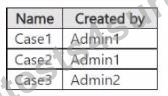
You have the eDiscovery cases shown in the following table.
The eDiscovery cases have the members shown in the following table.

For each of the following statements, select Yes if the statement is true. Otherwise, select No.
NOTE: Each correct selection is worth one point.

You have the eDiscovery cases shown in the following table.
The eDiscovery cases have the members shown in the following table.
For each of the following statements, select Yes if the statement is true. Otherwise, select No.
NOTE: Each correct selection is worth one point.
Correct Answer:

