

2026 Updated FCP_FCT_AD-7.4 Tests Engine pdf - All Free Dumps Guaranteed!
Latest Fortinet Network Security Expert FCP_FCT_AD-7.4 Actual Free Exam Questions
NEW QUESTION # 33
Refer to the exhibit. Why is the endpoint tagged as indicator of compromise (IOC) suspicious?
- A. The administrator student1 on FortiAnalyzer executed the playbook.
- B. The FortiClient EMS fabric connector is configured on FortiAnalyzer.
- C. The FortiClient EMS administrator manually tagged it using the console.
- D. The endpoint hq-pc-1 is tagged with the security posture tag IOC suspicious.
Answer: A
Explanation:
The log shows that FortiAnalyzer (FAZ) tagged the endpoint as [IOC Suspicious] immediately after student1 logged in, indicating that the administrator executed a playbook to automatically tag the endpoint based on the IOC.
NEW QUESTION # 34
Refer to the exhibit. Based on the Security Fabric automation settings, what action will be taken on compromised endpoints?
- A. Endpoints will be quarantined through EMS
- B. Endpoints will be quarantined through FortiSwitch
- C. An email notification will be sent for compromised endpoints
- D. Endpoints will be banned on FortiGate
Answer: A
Explanation:
Based on the Security Fabric automation settings shown in the exhibit:
The automation stitch is configured with a trigger for a "Compromised Host." The action specified for this trigger is "Quarantine FortiClient via EMS." This indicates that when an endpoint is detected as compromised, FortiClient EMS will quarantine the endpoint as part of the automation process.
Therefore, the action taken on compromised endpoints will be to quarantine them through EMS.
NEW QUESTION # 35
Which FortiGate CLI command shows all the ZTNA IP and MAC addresses learned from FortiClient EMS?
- A. diagnose endpoint wad-comm find-by ip-vdom
- B. diagnose firewall dynamic list
- C. diagnose wad dev query-by uid
- D. diagnose endpoint record list
Answer: B
Explanation:
# diagnose firewall dynamic list
List EMS ZTNA tags and all dynamic IP and MAC addresses.
https://docs.fortinet.com/document/fortigate/7.0.0/new-features/286458/ztna-troubleshooting-and- debugging
NEW QUESTION # 36
Refer to the exhibit, which shows multiple endpoint policies on FortiClient EMS.
Which policy is applied to the endpoint in the AD group trainingAD?
- A. The Default policy because it has the highest priority
- B. Both the Sales and Training policies because their priority is higher than the Default policy
- C. The Training policy
- D. The sales policy
Answer: C
Explanation:
Observation of Endpoint Policies:
The exhibit shows multiple endpoint policies with their assigned groups, priority levels, and enabled status.
Evaluating Policy Assignment:
The Training policy is specifically assigned to the "trainingAD.training.lab" group, with a higher priority than the Default policy.
Conclusion:
The correct policy applied to the endpoint in the AD group "trainingAD" is the Training policy (A).
NEW QUESTION # 37
In a ForliSandbox integration, what does the remediation option do?
- A. Deny access to a tile when it sees no results
- B. Alert and notify only
- C. Wait for FortiSandbox results before allowing files
- D. Exclude specified files
Answer: B
Explanation:
Understanding FortiSandbox Integration:
In a FortiSandbox integration, various remediation options are available for handling suspicious files.
Evaluating Remediation Options:
The remediation option for alerting and notifying without blocking access or waiting for results is essential to understand.
Conclusion:
The correct action for the remediation option in this context is to alert and notify only.
NEW QUESTION # 38
Refer to the exhibit.
Based on the FortiClient tog details shown in the exhibit, which two statements ace true? (Choose two.)
- A. The filename is sent to FortiSandbox for further inspection.
- B. The file location is \??\D:\Users\.
- C. The file status is Quarantined
- D. The filename Is Unconfirmed 899290.crdovnload.
Answer: C,D
NEW QUESTION # 39
Exhibit.
Based on the logs shown in the exhibit, why did FortiClient EMS tail to install FortiClient on the endpoint?
- A. The remote registry service is not running.
- B. The Windows installer service is not running.
- C. The task scheduler service is not running.
- D. The FortiClient antivirus service is not running.
Answer: C
Explanation:
https://community.fortinet.com/t5/FortiClient/Technical-Note-FortiClient-fails-to-install-from-FortiClient- EMS/ta-p/193680 The deployment service error message may be caused by any of the following. Try eliminating them all, one at a time.
1. Wrong username or password in the EMS profile
2. Endpoint is unreachable over the network
3. Task Scheduler service is not running
4. Remote Registry service is not running
5. Windows firewall is blocking connection
NEW QUESTION # 40
An administrator is required to maintain a software vulnerability on the endpoints, without showing the feature on the FortiClient. What must the administrator do to achieve this requirement?
- A. Use the default endpoint profile
- B. Click the hide icon on the vulnerability scan profile assigned to endpoint
- C. Disable select the vulnerability scan feature in the deployment package
- D. Select the vulnerability scan feature in the deployment package, but disable the feature on the endpoint profile
Answer: B
Explanation:
* Requirement Analysis:
* The administrator needs to maintain a software vulnerability scan on endpoints without showing the feature on FortiClient.
* Evaluating Options:
* Disabling the feature in the deployment package or endpoint profile would remove the functionality entirely, which is not desired.
* Using the default endpoint profile may not meet the specific requirement of hiding the feature.
* Clicking the hide icon on the vulnerability scan profile assigned to the endpoint will keep the feature active but hidden from the user's view.
* Conclusion:
* The correct action is to click the hide icon on the vulnerability scan profile assigned to the endpoint (C).
References:
FortiClient EMS feature configuration and management documentation from the study guides.
NEW QUESTION # 41
Exhibit.
Based on the FortiClient logs shown in the exhibit, which endpoint profile policy is currently applied lo the ForliClient endpoint from the EMS server?
- A. Fortinet-Training
- B. Default configuration policy c
- C. Compliance rules default
- D. Default
Answer: A
Explanation:
* Observation of Logs:
* The logs show a policy named "Fortinet-Training" being applied to the endpoint.
* Evaluating Policies:
* The log entries indicate that the "Fortinet-Training" policy was received and applied.
* Conclusion:
* Based on the logs, the currently applied policy on the FortiClient endpoint is "Fortinet-Training".
References:
FortiClient EMS policy configuration and log analysis documentation from the study guides.
NEW QUESTION # 42
Based on the FortiClient logs shown in the exhibit, which endpoint profile policy is currently applied lo the ForliClient endpoint from the EMS server?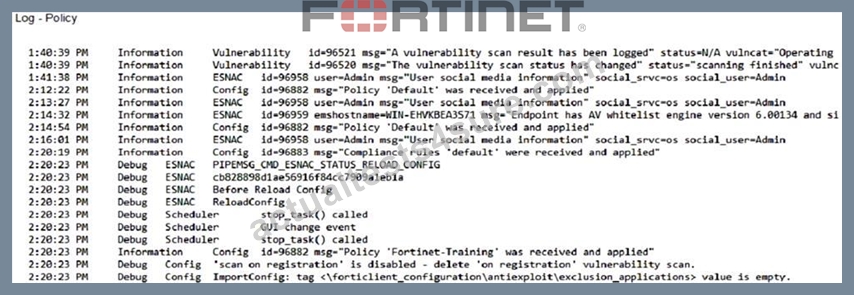
- A. Fortinet-Training
- B. Compliance rules default
- C. Default configuration policy
- D. Default
Answer: A
Explanation:
Observation of Logs:
The logs show a policy named "Fortinet-Training" being applied to the endpoint.
Evaluating Policies:
The log entries indicate that the "Fortinet-Training" policy was received and applied.
Conclusion:
Based on the logs, the currently applied policy on the FortiClient endpoint is "Fortinet-Training".
NEW QUESTION # 43
An administrator must deploy FortiClient for an organization that has BYOD and remote users.
What can the administrator use to deploy FortiClient? (Choose one answer)
- A. FortiClient zero-touch provisioning
- B. Group Policy Object (GPO)
- C. Microsoft System Center Configuration Manager (SCCM)
- D. Microsoft Intune
Answer: D
Explanation:
According to theFortiClient EMS Administrator Study Guideand theFortinet Document Library (7.2/7.4 versions), the most effective method for deploying FortiClient toBYOD (Bring Your Own Device)and remote usersis usingMicrosoft Intune(or other supported Mobile Device Management - MDM solutions).
1. Why Microsoft Intune (Answer C) is the Correct Choice:
* Cloud-Based Accessibility:Unlike GPO or SCCM, which traditionally require a direct connection to the local Active Directory (AD) domain or a VPN to reach the on-premises infrastructure, Microsoft Intune is a cloud-based MDM. This makes it the native choice forremote userswho may not always be on the corporate network.
* BYOD Management:Intune is specifically designed to manage a variety of operating systems (Windows, macOS, iOS, Android) that are common in BYOD environments. It allows administrators to push the FortiClient installation package and enrollment configuration (such as the invitation_code or ems_server details) directly to the user's device via the cloud.
* Integration with EMS:FortiClient EMS 7.2/7.4 provides specific documentation forIntune Integration. Administrators can create a custom MSI or .pkg installer in EMS, upload it to Intune, and use Intune's app configuration policies to automate the Telemetry connection to EMS.
2. Why Other Options are Incorrect for this Scenario:
* A. FortiClient zero-touch provisioning:While FortiClient supports zero-touch provisioning (particularly for mobile or through FortiCloud), in the context of a "deployment tool" for an organization's broad BYOD and remote fleet, it is typically afeatureorprocessfacilitated by an MDM like Intune rather than the standalone deployment mechanism for the initial software package on third- party remote devices.
* B. Microsoft SCCM:SCCM (now part of Microsoft Configuration Manager) is heavily reliant on on- premises infrastructure and is generally used for corporate-owned, domain-joined devices. It is less flexible than Intune for managing "unmanaged" BYOD devices belonging to remote users.
* D. Group Policy Object (GPO):GPO requires the device to be joined to theActive Directory (AD) Domain. BYOD devices are typically not domain-joined, and remote devices cannot receive GPO updates unless they are connected via VPN at the time of the policy refresh, making it unsuitable for this specific use case.
3. Curriculum References:
* EMS Administration Guide (Deployment Section):Specifies that for endpoints not reachable via AD
/Workgroups (which covers remote and BYOD), administrators should use theInstaller Linkmethod or anMDM (like Microsoft Intune).
* Intune Deployment Guide for FortiClient:Detail the specific use ofConfiguration Keys(e.g., cloud_invite_code, ems_server) that are passed from Intune to the FortiClient app to ensure that once the remote user installs the app, it automatically registers to the correct EMS instance.
NEW QUESTION # 44
Refer to the exhibit. Which method can FortiClient use to register to FortiClient EMS based on the configuration?
- A. FortiClient can connect only with an invitation code.
- B. FortiClient can connect using the IP address of FortiClient EMS.
- C. FortiClient can connect to FortiClient EMS using a custom port for telemetry.
- D. FortiClient can connect after providing location authentication.
Answer: B
Explanation:
The configuration shows the FortiClient download URL using the IP address of the EMS server.
This allows FortiClient to register by connecting directly to the EMS server using its IP address.
NEW QUESTION # 45
Which component or device defines ZTNA lag information in the Security Fabric integration?
- A. FortiClient EMS
- B. FortiGate
- C. FortiGate Access Proxy
- D. FortiClient
Answer: A
Explanation:
* Understanding ZTNA:
* Zero Trust Network Access (ZTNA) requires defining tags for identifying and managing endpoint access.
* Evaluating Components:
* FortiClient EMS is responsible for managing and defining ZTNA tag information within the Security Fabric.
* Conclusion:
* The correct component that defines ZTNA tag information in the Security Fabric integration is FortiClient EMS.
References:
ZTNA and FortiClient EMS configuration documentation from the study guides.
NEW QUESTION # 46
Refer to the exhibits. Antivirus software is installed on a Windows 10 endpoint, but the windows application firewall is stopping it from running.
Which action will FortiClient take on the endpoint?
- A. FortiClient will quarantine the endpoint until compliant.
- B. FortiClient telemetry will be disconnected because of failed compliance.
- C. FortiClient will tag the endpoint as non-compliant.
- D. FortiClient will notify the user to enable antivirus.
Answer: C
Explanation:
The security posture tagging rules evaluate whether antivirus software is installed and running.
Since the antivirus is blocked by the Windows firewall, it is not running, so FortiClient will tag the endpoint as non-compliant.
NEW QUESTION # 47
Refer to the exhibits.

Which show the Zero Trust Tag Monitor and the FortiClient GUI status.
Remote-Client is tagged as Remote-Users on the FortiClient EMS Zero Trust Tag Monitor.
What must an administrator do to show the tag on the FortiClient GUI?
- A. Change the user identity settings to enable tag visibility
- B. B. Change the FortiClient system settings to enable tag visibility
- C. Update tagging rule logic to enable tag visibility
- D. Change the endpoint control setting to enable tag visibility
Answer: B
Explanation:
Based on the exhibits provided:
* The "Remote-Client" is tagged as "Remote-Users" in the FortiClient EMS Zero Trust Tag Monitor.
* To ensure that the tag "Remote-Users" is visible in the FortiClient GUI, the system settings within FortiClient need to be updated to enable tag visibility.
* The tag visibility feature is controlled by FortiClient system settings which manage how tags are displayed in the GUI.
Therefore, the administrator needs to change the FortiClient system settings to enable tag visibility.
References
* FortiClient EMS 7.2 Study Guide, Zero Trust Tagging Section
* FortiClient Documentation on Tag Management and Visibility Settings
NEW QUESTION # 48
When site categories are disabled in FortiClient web filter, which feature can be used to protect the endpoint from malicious web access?
- A. FortiSandbox URL list
- B. Real-time protection list
- C. Block malicious websites on antivirus
- D. Web exclusion list
Answer: D
Explanation:
Web Filter Functionality:
When site categories are disabled in the FortiClient web filter, the endpoint still requires protection from malicious web access.
Alternative Protection Features:
The web exclusion list can be used to manage and block specific URLs that are known to be malicious, providing a way to control and secure web access even without site categories being enabled.
Conclusion:
The correct feature that can be used to protect the endpoint in this scenario is the web exclusion list (D).
NEW QUESTION # 49
FortiClient EMS endpoint policies
Refer to the exhibit, which shows multiple endpoint policies on FortiClient EMS. Which policy is applied to the endpoint in the AD group trainingAD
- A. The Default policy because it has the highest priority
- B. Both the Sales and Training policies because their priority is higher than the Default policy
- C. The Training policy
- D. The sales policy
Answer: C
Explanation:
* Observation of Endpoint Policies:
* The exhibit shows multiple endpoint policies with their assigned groups, priority levels, and enabled status.
* Evaluating Policy Assignment:
* The Training policy is specifically assigned to the "trainingAD.training.lab" group, with a higher priority than the Default policy.
* Conclusion:
* The correct policy applied to the endpoint in the AD group "trainingAD" is the Training policy (A).
References:
FortiClient EMS policy configuration and priority management documentation from the study guides.
NEW QUESTION # 50
What action does FortiClient anti-exploit detection take when it detects exploits?
- A. Deletes the compromised application process
- B. Blocks memory allocation to the compromised application process
- C. Terminates the compromised application process
- D. Patches the compromised application process
Answer: C
Explanation:
The anti-exploit detection protects vulnerable endpoints from unknown exploit attacks. FortiClient monitors the behavior of popular applications, such as web browsers (Internet Explorer, Chrome, Firefox, Opera), Java/Flash plug-ins, Microsoft Office applications, and PDF readers, to detect exploits that use zero-day or unpatched vulnerabilities to infect the endpoint. Once detected, FortiClient terminates the compromised application process.
NEW QUESTION # 51
Which two statements are true about ZTNA? {Choose two.)
- A. ZTNA manages access through the client only.
- B. ZTNA provides role-based access.
- C. ZTNA provides a security posture check.
- D. ZTNA manages access for remote users only.
Answer: B,C
Explanation:
ZTNA (Zero Trust Network Access) is a security architecture that is designed to provide secure access to network resources for users, devices, and applications. It is based on the principle of
"never trust, always verify," which means that all access to network resources is subject to strict verification and authentication.
Two functions of ZTNA are:
ZTNA provides a security posture check: ZTNA checks the security posture of devices and users that are attempting to access network resources. This can include checks on the device's software and hardware configurations, security settings, and the presence of malware.
ZTNA provides role-based access: ZTNA controls access to network resources based on the role of the user or device. Users and devices are granted access to only those resources that are necessary for their role, and all other access is denied. This helps to prevent unauthorized access and minimize the risk of data breaches.
NEW QUESTION # 52
Which statement about FortiClient enterprise management server is true?
- A. It provides centralized management of FortiGate devices.
- B. It provides centralized management of Chromebooks running real-time protection
- C. lt provides centralized management of multiple endpoints running FortiClient software.
- D. It provides centralized management of FortiClient Android endpoints only.
Answer: C
Explanation:
FortiClient EMS is designed to provide centralized management and control of multiple endpoints running FortiClient software. It serves as a central management server that allows administrators to efficiently manage and configure a large number of FortiClient installations across the network.
NEW QUESTION # 53
Refer to the exhibit. Based on the settings shown in the exhibit what action will FortiClient take when it detects that a user is trying to download an infected file?
- A. Quarantines the infected files and logs all access attempts
- B. Allows the infected file to download without scan
- C. Blocks the infected files as it is downloading
- D. Sends the infected file to FortiGuard for analysis
Answer: B
Explanation:
Block Malicious Website has nothing to do with infected files. Since Realtime Protection is OFF, it will be allowed without being scanned.
Based on the settings shown in the exhibit:
Realtime Protection: OFF
Dynamic Threat Detection: OFF
Block malicious websites: ON
Threats Detected: 75
The "Realtime Protection" setting is crucial for preventing infected files from being downloaded and executed. Since "Realtime Protection" is OFF, FortiClient will not actively scan files being downloaded. The setting "Block malicious websites" is intended to prevent access to known malicious websites but does not scan files for infections.
Therefore, when a user tries to download an infected file, FortiClient will allow the file to download without scanning it due to the Realtime Protection being OFF.
NEW QUESTION # 54
......
FCP_FCT_AD-7.4 Dumps Updated Practice Test and 97 unique questions: https://www.actualtests4sure.com/FCP_FCT_AD-7.4-test-questions.html
Latest 100% Exam Passing Ratio - FCP_FCT_AD-7.4 Dumps PDF: https://drive.google.com/open?id=1znq0efRIaNrvcRbLAiPR0y01-XFBUQZb
